When someone messages an AI chatbot, the reply feels instant. Behind those few seconds, several things happen at once: the system interprets what was said, looks up useful information, reasons through an answer and, in many cases, runs an action —checking a CRM, booking an appointment, or opening a ticket.
If you already know what an AI chatbot is and now want to understand how it really works —and whether it fits your business— this article is the place. We will not stop at “it uses artificial intelligence.” We will open the hood.
By the end you should see clearly that a modern business chatbot is not “ChatGPT with your logo.” It is a set of parts: the language model, a knowledge base, information retrieval (RAG), system instructions, integrations, and automations. Efibrain brings those parts together in a business-ready solution.
If you prefer to see the product working with your own documentation, you can request a demo whenever you like.
What happens when a user sends a message?
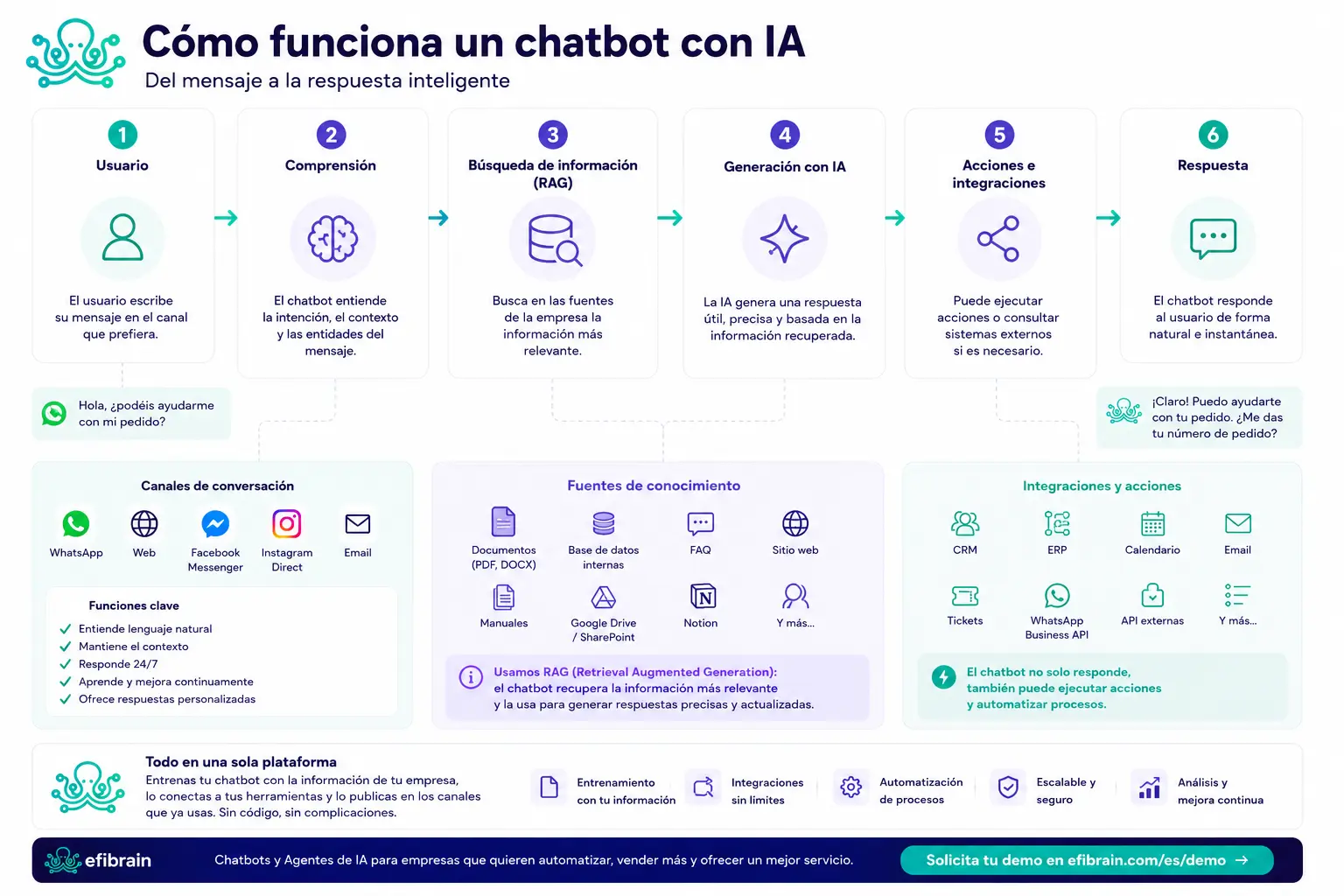
Picture a customer on WhatsApp at 11 p.m.: “Can I change the address on order 4821?” To them it is one sentence. To the chatbot it is the start of a chain.
First the message arrives on the channel (web, WhatsApp, Teams…). The conversation is identified: is this someone new, or someone who wrote earlier? That matters, because prior context changes the answer.
Then comes interpretation. The system does not only “read” words; it tries to capture intent (address change), entities (order 4821), and tone (urgent, annoyed, or just curious?).
With that clear, it looks up information: shipping policies, order status in the ERP, CRM history. Only then does the AI model draft a reply. In well-designed setups there is a validation layer: do not invent prices, do not promise what policy forbids, hand off to a human if the case leaves the perimeter.
Finally the reply goes back to the channel. Sometimes, before or after the text, an action fires: update a field, create a lead, send an internal email.
That path —message, interpretation, retrieval, generation, validation, reply— is the core of how an AI chatbot works. Everything else is a variation on the same idea.
How does a chatbot understand what a person writes?
This is where people often mix magic with engineering. A chatbot does not “understand” like a person. It works with signals.
Intent is the “why” of the message. “I want to return this,” “What time do you close?” and “I was charged twice” are three different intents —even if a customer dumps them in one paragraph.
Entities are the concrete data: order number, date, product, city, email. Without entities, many cases cannot be resolved; with them, the bot can query real systems instead of guessing.
Context is what was already said. If the customer just gave the order number, asking for it again two messages later is bad design. Short-term session memory holds that while the thread lasts.
And natural language is tolerance for typos, abbreviations, and different ways to ask the same thing. “shipment status,” “where is my package,” and “tracking” can land in the same useful place.
What matters for a business: that understanding does not replace business rules. AI routes and drafts; you decide what it may say, what it must ask, and when to hand off to a human. For a product overview, the AI chatbot landing covers the approach with less technical depth.
What role does artificial intelligence play?
When people talk about a generative AI chatbot, they almost always mean a language model (LLM). It is the piece that turns intent + data into coherent text, in the tone you configure.
Several well-known models coexist today: GPT, Claude, Gemini, Mistral, Llama… Each has trade-offs in cost, latency, language quality, or long-instruction following. For the business, the model name matters less than the control around it.
A business chatbot does not have to marry a single model. It can use a cheaper, faster one for FAQs and a stronger one for nuanced cases. Or switch providers without rebuilding the whole support journey.
The model alone does not reliably know your catalog or your 2026 return policy. That is not “inside” the LLM in a trustworthy way. That is why you need a knowledge base and RAG, covered next.
Think of it this way: the model is a talented writer. Documentation, integrations, and rules are the brief. Without a brief, the writer invents confidently —and that is a problem in a company.
How does it look up company information?
This section is by far the most important if you are evaluating a chatbot for business.
A generic chatbot answers with what the model “knows.” A business chatbot answers with what your company has made available: product PDFs, manuals, internal FAQs, web pages, databases, SharePoint folders, Notion, CRM records…
The typical path is easy to explain: you upload or connect documentation; that information is organized into a knowledge base; when a question arrives, the system retrieves only the relevant chunks; and the AI generates an answer grounded in those chunks.
It is not the same as “the bot read a PDF once” versus “the bot queries the PDF (or CRM) at question time.” The second is what makes an enterprise GPT-style chatbot useful day to day: current prices, real hours, live procedures.
Common sources in serious rollouts: corporate site and help center, PDF manuals, support FAQs, repositories like SharePoint or Notion, and live CRM or ecommerce data. The cleaner and fresher that raw material, the better the assistant replies. Garbage in, garbage out —here too.
- 1. PDF, manual, FAQs, or other company sources.
- 2. They are indexed in the chatbot knowledge base.
- 3. The user asks a question.
- 4. RAG retrieves only the relevant fragments.
- 5. The AI generates a personalized answer with that context.
What is RAG and why does it improve a chatbot?
RAG means Retrieval-Augmented Generation. It sounds like jargon; the idea is very human.
Instead of asking the model to “remember” your 80-page manual, the system first finds the paragraphs that relate to the question and only then asks the model to answer using those paragraphs. Like an employee who opens the right procedure before replying.
Three practical advantages. First: it does not memorize whole documents opaquely; it looks them up. Second: it retrieves only what matters, so the answer does not drown in noise. Third: if you update a PDF or FAQ, the chatbot can work with fresh information without “retraining” a model from scratch.
That does not remove maintenance. If you change a price on the website and leave an old PDF in the knowledge base, the bot may cite the old document. RAG greatly improves how an AI chatbot works; it does not replace someone responsible for operational truth.
When you hear “AI chatbot architecture” in a demo, ask about this: how do you retrieve information? Can you cite the source? What happens if there is no data? Good RAG, with clear limits, is what separates a reliable assistant from a model that invents elegantly.
How does it connect to CRM, ERP, or WhatsApp?
Conversation is only the visible layer. Business value shows up when the chatbot stops being an island.
On WhatsApp or the web, the customer writes. In the CRM, sales needs the lead with context. In the ERP, logistics has order status. In Google Calendar or a clinic agenda, there are open slots. The chatbot can read and, with permissions, write to those systems.
Real examples we see often: look up an order and return tracking; create or update a CRM contact; open a help-desk ticket; check availability and book; send a confirmation email; notify a Slack or Teams channel when a case is urgent.
Microsoft Teams or Slack can also be an internal channel: the same conversational engine can help employees (HR policies, project status) with a different knowledge base and different permissions. Not the same public bot; the same AI chatbot operating logic with another perimeter.
If the focus is messaging, the guide on how to automate WhatsApp covers API, templates, and day-to-day operations. Here the idea is enough: the chatbot is the interface; integrations are the muscle.
| What the chatbot typically does | |
|---|---|
| Handle, qualify, and escalate conversations | |
| Web (widget) | Answer questions and capture leads on the visit |
| CRM | Create/update contacts and opportunities |
| ERP / ecommerce | Look up orders, stock, or invoices |
| Google Calendar | Check slots and book appointments |
| Send confirmations or internal alerts | |
| Microsoft Teams / Slack | Notify the team or assist employees |
How does a chatbot learn?
“Learn” is a dangerous word in software sales. Better to bring it down to earth.
An AI chatbot is usually not “trained” the 2018 way: you do not need to label thousands of phrases by hand for every intent. The language model already comes with general conversation ability. What you add is company knowledge, instructions (who you are, tone, limits), and examples of good answers.
There is a continuous improvement loop, and it is more boring —and more useful— than it sounds: review real conversations, spot new questions, update the knowledge base, adjust flow branches, fix weak replies. That is “training” in business practice.
You can also refine with feedback: thumbs up/down, resolution tags, or the team flagging “this reply should not have gone out.” Without that circuit, the assistant freezes on launch day.
Short answer to “how do you train a chatbot”: configure it, feed it documentation, connect data, and iterate on real conversations. Do not leave it in a corner waiting to become wise.
Can it run actions automatically?
Yes —and that is where a chatbot stops being a conversational search box and starts looking like an operations teammate.
Typical actions: book an appointment, create a qualified lead, open a ticket, look up an order, update a CRM field, send an email, tag the conversation by department. Each needs rules: which fields are required, what permissions the bot has, when to ask for human confirmation.
That layer overlaps with AI automation. The chatbot is the conversational front door; automation is what happens in your systems when the conversation hits a concrete step.
Implementation tip: start with one or two high-volume, low-risk actions (appointment + FAQ, or lead + CRM). Expanding the action catalog is easy once the pilot shows people actually use the channel.
How is it different from ChatGPT?
This question shows up in almost every demo. It makes sense: many people have tried ChatGPT and wonder why pay for “another chat.”
ChatGPT is a brilliant generic assistant. It does not know your company unless you paste context into the prompt. It does not live inside your WhatsApp Business API. It does not update your CRM. It does not, by default, respect your permissions, brand tone, or return policy.
A business chatbot is designed for a perimeter: your documents, your channels, your integrations, your rules. It may use a GPT-class model underneath, yes —but the value is not the model in the abstract; it is the system around it.
The table summarizes the contrast. If you also want the boundary with a human teammate, the chatbot vs human agent article helps allocate responsibilities.
| ChatGPT | Business chatbot | AI agent | |
|---|---|---|---|
| Focus | Generic | Personalized to your business | Multi-step processes |
| Knows your company | No (unless prompted) | Yes (knowledge base) | Yes + multiple sources |
| Integrations | Limited / manual | CRM, ERP, WhatsApp, web… | Chains systems |
| Processes | Does not run your ops | Automates defined actions | Orchestrates richer workflows |
| Permissions & control | User account | Enterprise governance | Rules + supervision |
| Best for | Ideas and general tasks | Support, sales, FAQs | Advanced automation |
How does an Efibrain AI chatbot work?
No sales speech: the practical path looks like this.
Upload or connect documentation —manuals, FAQs, site, repositories—. Configure the assistant: tone, limits, what it may and may not answer. Connect channels: web widget, WhatsApp, and so on. Add integrations where they help: CRM, calendar, orders. Publish and review real conversations in the first weeks.
Efibrain, a product in the Efiprox ecosystem, is built so operations or support teams can run that cycle without standing up an AI lab. Product detail and use cases live on chatbot for business and how the platform works.
If you want to see the flow with your company’s documentation —not a generic demo— request a demo. One conversation shows better than a thousand paragraphs whether the fit is real.
- 1. Upload documentation and knowledge sources.
- 2. Configure the assistant (instructions, tone, limits).
- 3. Connect channels (web, WhatsApp…).
- 4. Add integrations (CRM, calendar, ERP…).
- 5. Publish and improve with real conversations.
What to take away from this guide
How an AI chatbot works, in one sentence: it interprets the message, retrieves relevant information, generates a controlled reply and, when needed, runs an action in your systems.
If you are in evaluation (MOFU), the next step is not “pick the most famous model.” It is deciding what knowledge you will feed, which channels matter, which actions help, and how you will measure resolution without a human versus handoff.
For customer service with an operational focus, the customer service chatbot article goes deeper on benefits and limits. For the mobile channel, how to automate WhatsApp. And if you still need the conceptual frame, what is an AI chatbot closes the cluster loop.
Frequently asked questions about how an AI chatbot works
How does an AI chatbot learn?
Mainly from the documentation and data you provide, tone and limit instructions, and iteration on real conversations. It does not “learn alone” magically: someone must update knowledge and review weak replies.
Does it need training?
It needs configuration and rollout: knowledge base, rules, channels, and integrations. It usually does not need a custom machine-learning project. It does need review time in the first weeks.
Can it query documents?
Yes. That is a core piece of a business chatbot: index manuals, FAQs, web pages, or other repositories and retrieve what matters for each question (RAG).
Can it answer using PDFs?
Yes, if the PDFs are in the knowledge base and the system retrieves the right fragments. Keep versions current so it does not cite outdated documents.
Can it access a CRM?
With the right integration, yes: look up contacts, create leads, update fields, or leave notes. Your company defines the permissions.
Does it work with WhatsApp?
Yes. In professional setups it usually connects via WhatsApp Business API, not only the free app. That way it can handle, qualify, and escalate with centralized history.
What is the difference from ChatGPT?
ChatGPT is generic. A business chatbot knows your documentation, integrates with your systems, runs on your channels, and respects business rules and permissions.
How long does implementation take?
A scoped pilot (FAQs + one channel) can be live in days or a few weeks. Projects with several integrations and actions usually take longer. A four-to-six-week pilot before expanding is common.
Can it automate tasks?
Yes: appointments, leads, tickets, order lookups, emails, CRM updates, and more —always with clear rules and defined limits.
Which AI model does it use?
It depends on the platform and use case. A business chatbot may rely on models such as GPT, Claude, Gemini, or others, and even combine them. What matters is control, the knowledge base, and integrations —not the model name in the abstract.
Looking for broader digital transformation? Discover Efiprox or get Efibrain from the dashboard.